
Let me share the possible reasons with you! 😄
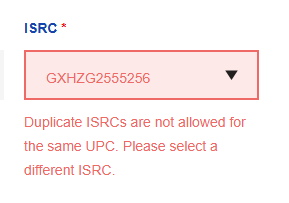
When submitting a revenue share form through us here at RouteNote, our system automatically checks your details to ensure everything is correct before processing. If you are unable to proceed with the form and aren’t sure why, check out some of these ideas and see if it applies to your situation. You may receive an error like this, for example:
Errors to check
- You have entered an invalid user ID
- You have entered an invalid RouteNote username
- Your percentages do not equal 100%
- You have listed the same ISRC twice within one share
- You haven’t selected Apply to All Tracks and have instead submitted the same data for each ISRC
- You have submitted the same data for the same UPC twice within one revenue share
Once these details are corrected, your form should submit without a hitch!
See also:
How long will my revenue shares take?
Why are some of my releases on my discography pink?
What percentage does RouteNote take?