
Let’s pin this down 📍
TikTok have created an in-app channel where creators can communicate with their followers. On the bulletin board, artists are able to post messages to stay in touch and share updates with their listeners. This is great news for users of RouteNote who distribute to this store as you will have more opportunity to promote your music!
How to create a bulletin board
- In the TikTok app, tap INBOX at the bottom of the page
- You will now either need to tap a banner to get started or tap the Chat button at the top
- Tap Create a bulletin board
- Use the Show on profile button to change the visibility of the bulletin board.
- Finally, tap Create to open the bulletin board up again.
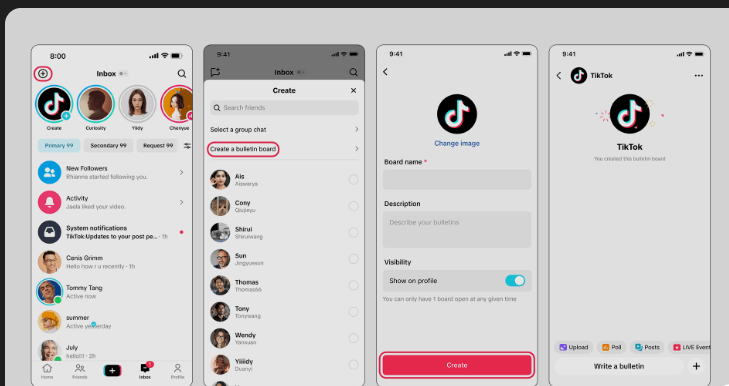
Please note you can only have one active bulletin board at a time. Only the artist’s followers will be able to join the bulletin board.
If you’d like more information about this, please reach out to TikTok’s support.
If you’d like more information about RouteNote, feel free to contact us.
See also:
How does TikTok distribution work?
What is Superfan Revenue Share on TikTok?
Can I sample content from TikTok?